
Download Summarify.me – AI‑Powered Summarization Tool for Fast, Accurate Summaries
What Is Summarify.me and Why It Matters
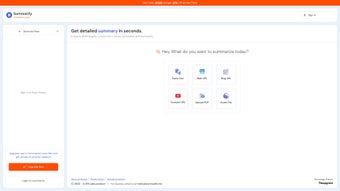
Summarify.me is an AI‑driven summarization tool that turns long‑form content into concise, easy‑to‑read extracts in seconds. Whether you’re a researcher needing quick insights from academic PDFs, a marketer skimming blog posts, or a student summarizing lecture videos, Summarify.me offers a secure, cloud‑based solution that works across browsers and devices. The platform supports a wide range of input types—including webpages, plain text, PDFs, and even YouTube videos—so you never have to copy‑paste manually again.
By leveraging large‑language‑model technology, the app not only shortens text but also preserves key ideas, arguments, and contextual nuances. Free users can generate up to ten summaries per month, while paid plans unlock unlimited usage, priority processing, and custom language options. With multi‑language output (including Pidgin, Marathi, Telugu, Turkish, Tamil, Yue Chinese, and Vietnamese) and style presets that mimic personalities like Elon Musk or Jordan Peterson, Summarify.me stands out as a versatile, multilingual summarization engine.
Its clean interface, instant results, and flexible export options make it a valuable addition to any productivity toolbox.
Core Features & AI Capabilities
- Multi‑Source Input: Summarify.me accepts URLs, uploaded PDFs, raw text, and YouTube video links, automatically extracting the most relevant content for summarization.
- AI‑Enhanced Summaries: Powered by state‑of‑the‑art language models, the tool creates coherent, context‑aware abstracts that retain the original meaning.
- Language Diversity: Output can be generated in over ten languages, from widely spoken tongues like Turkish and Vietnamese to regional dialects such as Marathi and Telugu.
- Style Templates: Choose a writing style inspired by thought leaders—Naval Ravikant, Elon Musk, Balaji Srinivasan, Joe Rogan, Jordan Peterson, and more—to match your brand voice or personal preference.
- Instant Processing: Summaries are delivered in seconds, allowing you to stay in the flow of research or content creation without waiting for batch processing.
- Secure Cloud Architecture: All data is encrypted in transit and at rest, ensuring your confidential documents stay private.
- Export Options: Download results as plain text, Markdown, or copy directly to clipboard for seamless integration with note‑taking apps.
- Free Tier with Limits: Generate up to 10 summaries per month without a credit card, perfect for occasional users or students.
- Scalable Pricing: Paid plans provide unlimited summaries, higher priority AI processing, and advanced customization for teams.
- Regular Updates: The development team rolls out frequent model improvements and UI tweaks to keep the experience fast and reliable.
The combination of these features makes Summarify.me a truly modern summarization software application. Its AI core is constantly learning from user feedback, which translates into more accurate and nuanced summaries over time. For professionals who need to stay on top of industry news, the ability to set a specific writing style is a game‑changer—it lets you generate briefing notes that read as if they were written by your preferred thought leader. Meanwhile, multilingual support opens doors for global teams that must synthesize content in different languages without hiring separate translators. All of this is delivered through a lightweight web app that works on any modern browser, meaning there’s no heavy download or installation required, yet the platform still feels like a dedicated desktop tool.
Installation, Setup, and Cross‑Platform Compatibility
Getting started with Summarify.me is intentionally frictionless. Since it is a web‑based app, there is no traditional installer for Windows, Mac, Android, or iOS. Simply navigate to summarify.me, click “Sign In”, and choose an avatar‑based login method (Google, Microsoft, or Apple). This approach eliminates the need for lengthy setup processes and ensures that you can download your summaries instantly, regardless of device.
Step‑by‑Step Usage Guide
- Create Your Account: Register with an email or social login. The free tier grants you ten summary credits per month.
- Select Input Type: Paste a URL, upload a PDF, drop a block of text, or paste a YouTube link. The system automatically detects the content type.
- Choose Language & Style: From the dropdown menus, pick your desired output language and any of the available writing‑style presets.
- Generate Summary: Click “Summarize”. Within seconds, a concise version appears in the result pane.
- Export or Copy: Use the download button to save as .txt or .md, or click “Copy” to paste directly into your workflow.
Because the service runs in the cloud, you benefit from continuous updates without manual patches. The platform is fully compatible with Windows 10/11, macOS Monterey and later, Chrome OS, Android 8+, and iOS 13+. Browser support includes Chrome, Edge, Firefox, and Safari, ensuring a consistent experience across desktops, laptops, tablets, and smartphones. For teams that prefer a more native feel, the website offers a “Add to Home Screen” option on mobile browsers, turning the web app into a pseudo‑desktop shortcut that launches in full‑screen mode. This hybrid approach gives you the speed of a downloadable app while retaining the flexibility of a cloud service.
Security is a top priority. All communications use HTTPS with TLS 1.3 encryption, and uploaded files are stored only for the duration of processing before being automatically purged. For enterprises, Summarify.me offers a dedicated “Secure Vault” add‑on that isolates data in a private cloud region, meeting GDPR and CCPA compliance requirements. Whether you are a solo freelancer or a large organization, the tool’s architecture is designed to scale securely.
Pros, Cons, Frequently Asked Questions, and Final Verdict
Pros
- Fast, AI‑driven summarization with results in seconds.
- Supports multiple input formats (web, PDF, text, video).
- Multilingual output and style presets for personalized tone.
- Secure, cloud‑based architecture with end‑to‑end encryption.
- Free tier available for casual users; scalable pricing for teams.
- No heavy download; works on Windows, macOS, Android, iOS, and Linux browsers.
Cons
- Free tier limited to ten summaries per month.
- Advanced language models may occasionally misinterpret highly technical jargon.
- No offline desktop client for users who need strict air‑gap environments.
- Customization beyond preset styles requires a paid plan.
Frequently Asked Questions
How does Summarify.me handle copyrighted material?
The service processes content only for the purpose of generating a summary and does not store or redistribute the original material. Uploaded files are automatically deleted after processing, ensuring compliance with copyright law. However, users should respect the terms of use of the source material and avoid summarizing content they are not authorized to use.
Can I use Summarify.me on a corporate VPN?
Yes. Because the platform runs over standard HTTPS, it works seamlessly behind most corporate firewalls and VPNs. For stricter security policies, the “Secure Vault” add‑on provides a dedicated, isolated environment that meets enterprise compliance standards.
Is there an API for developers?
Summarify.me offers a RESTful API that allows developers to integrate summarization capabilities into their own applications, chatbots, or workflow tools. API keys are generated from the user dashboard, and usage is billed based on the number of tokens processed.
What happens to my data after I generate a summary?
All input files and raw text are encrypted during transmission and are stored only temporarily for the duration of the summarization process. Once the summary is delivered, the original content is automatically purged from the server within 15 minutes.
How do I upgrade from the free plan?
Log in to your account, navigate to the “Pricing” page, and select the plan that matches your needs. Payments are processed securely via Stripe, and you receive immediate access to unlimited summaries and premium features once the transaction is complete.
Final Verdict & Call to Action
Summarify.me delivers on its promise of quick, accurate, and customizable summarization across a wide range of content types and languages. Its AI backbone, combined with thoughtful UX touches—like style presets and multilingual output—makes it a standout tool for students, marketers, researchers, and busy professionals. While the free tier’s ten‑summary limit may feel restrictive for power users, the paid plans are competitively priced and unlock features that justify the investment. If you regularly sift through long articles, reports, or video transcripts, give Summarify.me a try. Download the web app today, create your free account, and experience the efficiency of AI‑driven summarization in seconds.



.png)



